
-
Producttext description
-
스마트 공장 설비 관리 View All#자산 관리 | #실시간 모니터링 | #통합 솔루션 | #산업 환경 설비 | #산업4.0 | #스마트제조 | #공장자동화산업용 핵심 부품 및 모듈 솔루션 View All#산업용IoT | #스마트제조 | #엣지컴퓨팅 | #데이터수집 | #산업용스토리지 | #시스템통합 | #임베디드솔루션 | #스마트헬스케어 | #산업자동화
-
Terms & Regulations
-
Exclusive OffersExclusive Offers with limited availability—act quickly before they’re gone.Deals on Popular ModelsBest-value promotions on top-selling and high-demand industrial devices
Your shipping country is set to %s, and products and promotions are
tailored accordingly. If you would like to change this, please switch to a different country.
Language
Currency
Hello
-
View CartCart
 Producttext description
 -
스마트 공장 설비 관리 View All#자산 관리 | #실시간 모니터링 | #통합 솔루션 | #산업 환경 설비 | #산업4.0 | #스마트제조 | #공장자동화산업용 핵심 부품 및 모듈 솔루션 View All#산업용IoT | #스마트제조 | #엣지컴퓨팅 | #데이터수집 | #산업용스토리지 | #시스템통합 | #임베디드솔루션 | #스마트헬스케어 | #산업자동화
-
Terms & Regulations
-
Exclusive OffersExclusive Offers with limited availability—act quickly before they’re gone.Deals on Popular ModelsBest-value promotions on top-selling and high-demand industrial devices
Redirect Website
To proceed with international shipping, you will be redirected to our IoTMart Global.
By continuing, you acknowledge and agree to our Terms & Conditions.
You’re Browsing from a Different Region
Orders from this site will only ship to Korea. For international shipping, please visit IoTMart Global.
Account FAQ
Welcome to Advantech IoTMart! Whether you are a new partner or a returning customer, we want to ensure your experience is seamless. This page compiles the most frequently asked questions regarding user accounts—from quick registration and retrieving lost passwords to logging in with your existing Advantech ID. Let us help you get started!
Registration & Login
How do I login?
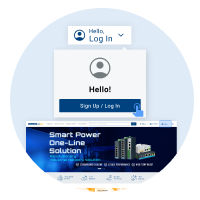
Advantech IoTMart is fully integrated with the Advantech Member system. If you already have an Advantech account, simply click "Hello! Login" in the page header to access the system. You can log in using your email and password, or choose a social media account (LinkedIn / Facebook / Google) for Single Sign-On (SSO).
How do I register?
Step 1. Click "Hello! Login" in the header and select the "Register / Login" button from the menu.
Step 2. Once on the Advantech Member page, click "Sign Up Today".
Step 3. Enter the “Create Your Advantech Account” page. Follow the instructions to fill in your member details to complete registration. (Fields marked with * are mandatory.)
Step 1
.png)
Step 2
.png)
Step 3
Account Usage
Can I use an account from other Advantech platforms to login?
Yes. Since Advantech IoTMart uses the universal Advantech Member system, if you already have an existing Advantech account, you can use it to log in to this platform directly without re-registering.
How do I modify my personal information (Name, Contact Email)?
After logging in, go to "Account & Order" in the header and select "My Account". The Profile section displays your name, company information, and country/region. To make changes, click the "Modify" button in the top right corner.
Note: As your email address serves as your unique account identifier, it cannot be changed.
.png)
Step 1
.png)
Step 2
.png)
Step 3
Can I store multiple shipping addresses? How do I manage my address book?
After logging in, go to "Account & Order" in the header and select "My Account". In the "My Address Book" section, you can add, edit, or delete frequently used shipping addresses. You can also designate a Primary Address, saving you from re-entering details.
Password
What should I do if I forget my password?
Click "Hello! Login" in the page header to go to the login page, then click "Forgot Password". Enter the email address you used to register along with the verification code. The system will send a password reset instruction email to your inbox.
.png)
Step 1
.png)
Step 2
.png)
Step 3
What if I don't receive the verification or password reset email?
Please check your Spam/Junk mail folder first. If you still haven't received it, please verify that your email address was entered correctly, or contact the Advantech support team at iotmart.kr@advantech.com for assistance.
Add Product Set to Cart
A predefined product set will be added to your cart. Please select an action for your current cart contents.
- One or more items are no longer available and will be automatically removed by the system.
- One or more parts in your configurable Product(s) are out of stock. Please ”Confirm” to accept the Product Set, then Adjust your selection before you Checkout.
Invalid Link
This shared cart link is no longer valid. Please ask for a new link or start a new cart.
Quantity Limit Exceeded
You have exceeded the limit. We will adjust it to the maximum value for you.